Best Music Production Gear for Beginners (2026 Guide)

Music production is evolving faster than ever before. With the rise of artificial intelligence and powerful digital tools, creators today can produce professional-quality music even from a small home studio.

Whether you are a beginner producer or an experienced musician, having the right equipment is essential. Tools like MIDI keyboards, audio interfaces, studio headphones, and microphones help improve workflow and sound quality.

In this guide, we will explore the best music production gear for beginners in 2026 to help you build a powerful and affordable home studio setup.

  • Frist Product
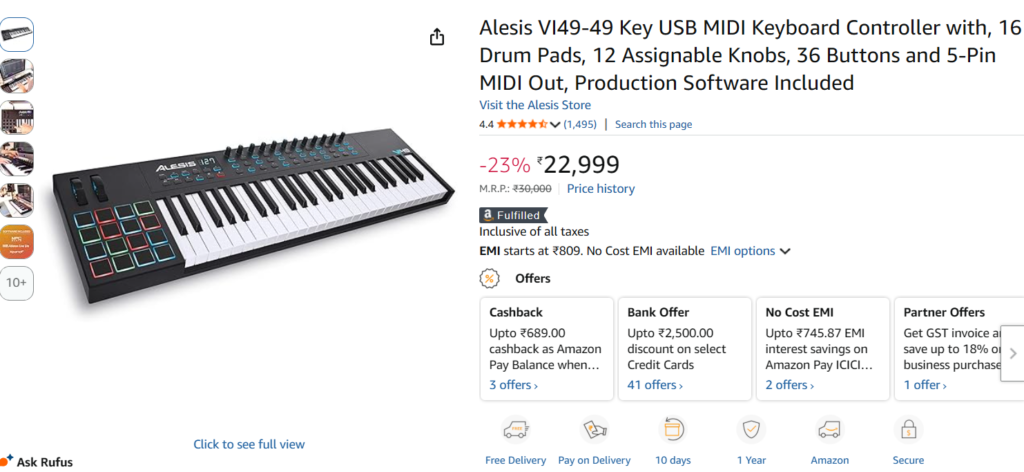
  • Alesis VI49 USB MIDI Keyboard Controller – Complete Review & Features
Overview

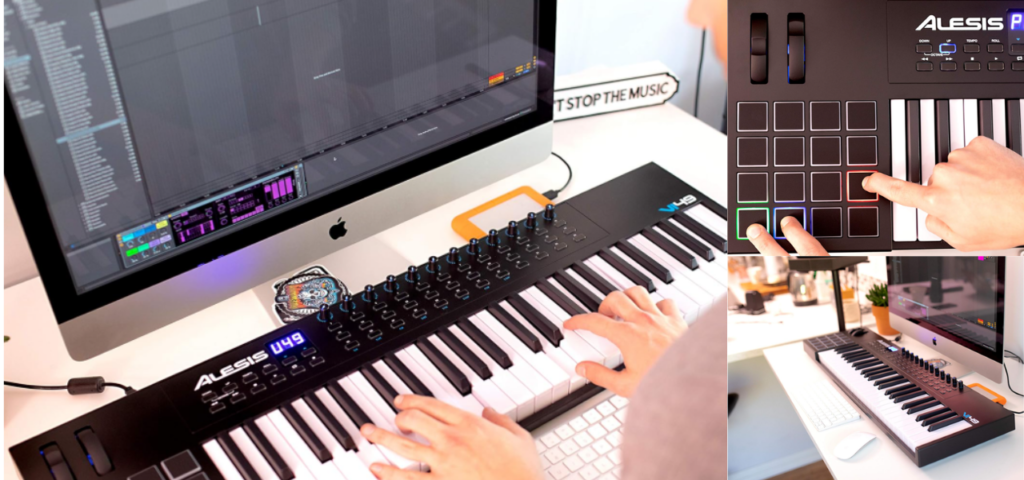
The Alesis VI49 USB MIDI Keyboard Controller is a powerful and versatile tool designed for modern music producers, beat makers, and musicians. With its 49 full-size semi-weighted keys, responsive RGB drum pads, and multiple assignable controls, this MIDI controller provides hands-on access to your virtual instruments and production so

Whether you are producing beats in FL Studio, creating melodies in Ableton Live, or composing music in Logic Pro, the Alesis VI49 helps streamline your workflow and bring your musical ideas to life. Its intuitive design makes it suitable for both beginners building their first home studio and experienced producers who need reliable MIDI control.

Key Features of Alesis VI49

1. 49 Semi-Weighted Full-Size Keys

The controller features 49 velocity-sensitive semi-weighted keys, offering a natural and expressive playing experience. These keys allow producers to perform melodies, chords, and basslines with better control and dynamics.

2. 16 Velocity-Sensitive RGB Drum Pads

The 16 backlit RGB drum pads are perfect for beat production. They allow you to trigger drum samples, loops, and sound effects easily. The velocity sensitivity helps create more dynamic and realistic drum patterns.

3. 12 Assignable Knobs

The controller includes 12 assignable knobs that can be mapped to different parameters inside your DAW such as:

  • Filter cutoff
  • Reverb
  • Delay
  • Volume automation
  • Instrument parameters

This gives producers greater control during recording and live performances.

4. 36 Assignable Buttons

With 36 assignable buttons, users can customize their workflow by mapping buttons to recording, playback, navigation, and other production tools.

5. USB MIDI and 5-Pin MIDI Connectivity

The Alesis VI49 supports both USB MIDI and 5-Pin MIDI output, allowing you to connect it to computers, synthesizers, or external MIDI hardware.

Specifications

FeatureDetails
Keys49 Semi-Weighted Keys
Pads16 Velocity-Sensitive RGB Pads
Knobs12 Assignable Knobs
Buttons36 Assignable Buttons
ConnectivityUSB MIDI + 5-Pin MIDI Out
CompatibilityFL Studio, Ableton Live, Logic Pro, Cubase
PowerUSB Powered

Why This MIDI Keyboard Is Great for Beginners

For beginners starting music production in 2026, the Alesis VI49 offers the perfect balance between functionality, performance, and affordability.

Benefits include:

  • Easy integration with most DAWs
  • Hands-on control over plugins and instruments
  • Great for composing melodies and beats
  • Affordable compared to high-end MIDI controllers

This makes it an excellent choice for producers setting up their first home studio.

Pros and Cons

Pros

βœ” Full-size semi-weighted keys
βœ” Responsive RGB drum pads
βœ” Multiple assignable controls
βœ” Compatible with most music production software
βœ” Great value for money

Cons

✘ No built-in sound engine (MIDI controller only)
✘ Slightly large for small desks

Who Should Buy the Alesis VI49?

This MIDI controller is ideal for:

  • Beginner music producers
  • Beat makers
  • Home studio musicians
  • Electronic music producers
  • Content creators and composers

If you want a reliable and feature-rich MIDI keyboard controller, the Alesis VI49 is a strong option.


Final Verdict

The Alesis VI49 USB MIDI Keyboard Controller is a feature-packed solution for producers who want more control over their music production workflow. With its expressive keys, responsive drum pads, and customizable knobs, it allows musicians to create melodies, program beats, and control effects effortlessly.

For beginners and intermediate producers building a home studio in 2026, the Alesis VI49 offers excellent functionality at an affordable price point, making it one of the best MIDI keyboard controllers in its category.

2️⃣ Second product

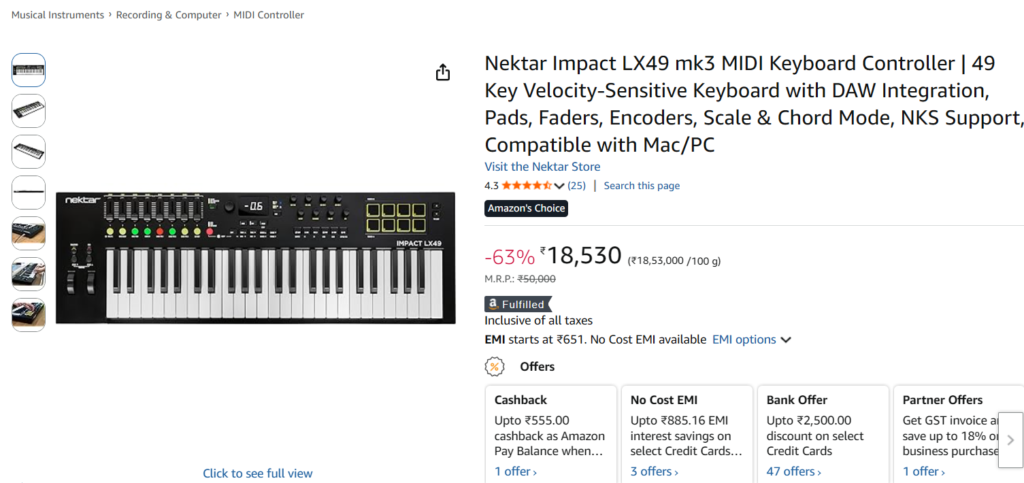
Nektar Impact LX49 MK3 MIDI Keyboard Controller – Complete Review
Overview

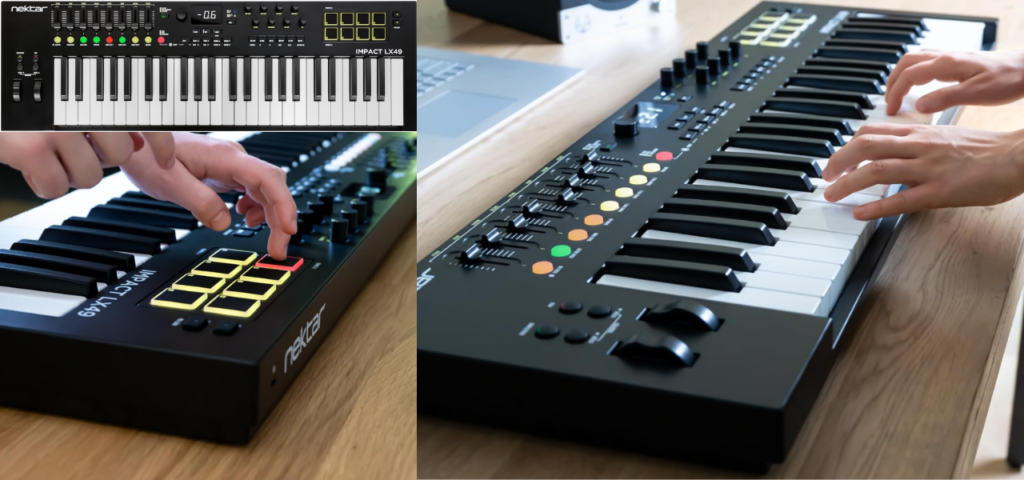
The Nektar Impact LX49 MK3 MIDI Keyboard Controller is a powerful and feature-rich controller designed for modern music producers, composers, and performers. With 49 velocity-sensitive keys, advanced DAW integration, performance pads, faders, and encoders, this keyboard gives producers full hands-on control over their music production workflow.

Whether you are producing electronic music, composing film scores, or creating beats in your home studio, the LX49 MK3 provides a smooth and intuitive experience. Its smart features such as Scale Mode, Chord Mode, and NKS compatibility make it a great option for both beginners and experienced musicians.

This controller works seamlessly with major digital audio workstations including FL Studio, Ableton Live, Logic Pro, Cubase, and Studio One, allowing you to control your software directly from the keyboard.

Key Features of Nektar Impact LX49 MK3

49 Velocity-Sensitive Keys

The LX49 MK3 comes with 49 full-size velocity-sensitive keys that respond naturally to your playing dynamics. This allows producers to create expressive melodies, chords, and basslines while maintaining a comfortable playing experience.

These keys are perfect for controlling virtual instruments, synthesizers, and orchestral plugins inside your DAW.

Deep DAW Integration

One of the biggest strengths of the LX49 MK3 is its advanced DAW integration. It provides automatic control mapping for many popular DAWs, allowing you to manage tracks, transport controls, mixer settings, and plugins directly from the controller.

Supported software includes:

  • FL Studio
  • Ableton Live
  • Logic Pro
  • Cubase
  • Reaper
  • Studio One

This integration helps producers work faster and focus more on creativity instead of technical setup.

Performance Pads for Beat Production

The controller features 8 velocity-sensitive performance pads designed for beat making and sample triggering.

You can use these pads to:

  • Trigger drum samples
  • Launch clips and loops
  • Perform finger drumming
  • Control sound effects

These pads make the LX49 MK3 an excellent choice for beat makers, EDM producers, and hip-hop producers.

Faders, Encoders, and Mixer Controls

The Nektar Impact LX49 MK3 includes multiple hardware controls that help producers manage their mix directly from the keyboard.

These controls include:

  • 9 mixer faders
  • 8 rotary encoders
  • Assignable buttons for custom functions

With these controls, you can easily adjust volume, filters, effects, and automation parameters without touching the computer mouse.

Scale Mode and Chord Mode

The Scale Mode feature allows users to play notes that stay within a selected musical scale. This is extremely useful for beginners who are still learning music theory.

Meanwhile, Chord Mode allows musicians to trigger full chords using a single key, making it easier to experiment with harmonies and chord progressions.

NKS Plugin Compatibility

The LX49 MK3 supports Native Kontrol Standard (NKS), which allows seamless integration with many professional virtual instruments.

This makes it easier to browse presets, adjust sound parameters, and control plugin settings directly from the keyboard.

Specifications

FeatureDetails
Keys49 Velocity-Sensitive Keys
Pads8 Performance Pads
Faders9 Mixer Faders
Encoders8 Rotary Encoders
ConnectivityUSB MIDI
CompatibilityMac & Windows
DAW SupportFL Studio, Ableton, Logic Pro, Cubase

Pros and Cons

Pros

βœ” 49 expressive velocity-sensitive keys
βœ” Excellent DAW integration
βœ” Performance pads for beat production
βœ” Mixer faders and rotary encoders
βœ” Beginner-friendly creative features

Cons

✘ No built-in audio interface
✘ Aftertouch not included

Who Should Buy This MIDI Keyboard

The Nektar Impact LX49 MK3 is perfect for:

  • Beginner music producers
  • Electronic music creators
  • Beat makers
  • Home studio musicians
  • Content creators producing background music

If you want a powerful MIDI keyboard controller with professional control options, the LX49 MK3 is a great choice.

Final Verdict

The Nektar Impact LX49 MK3 MIDI Keyboard Controller offers an excellent combination of performance, control, and affordability. With its expressive keyboard, smart production tools, and deep DAW integration, it allows musicians to create music faster and more efficiently.

For producers building a home studio in 2026, the LX49 MK3 is one of the best MIDI keyboard controllers available in its category.
3rd Product – Focusrite Scarlett Solo 4th Gen USB Audio Interface

Overview

The Focusrite Scarlett Solo 4th Gen USB Audio Interface is one of the most popular audio interfaces used by musicians, guitarists, vocalists, and music producers around the world. Known for its exceptional sound quality and reliable performance, the Scarlett Solo is designed to deliver professional studio-quality recordings even in a home studio environment.

This compact yet powerful audio interface allows you to connect microphones, guitars, and instruments directly to your computer for recording and music production. With high-quality preamps, ultra-low noise performance, and high-resolution audio conversion, the Scarlett Solo 4th Gen ensures that every recording captures the true detail of your sound.

Whether you are recording vocals, guitar tracks, podcasts, or producing music in your home studio, the Scarlett Solo 4th Gen provides a simple and powerful recording solution.

Key Features of Focusrite Scarlett Solo 4th Gen

Studio-Quality Microphone Preamps

The Scarlett Solo 4th Gen features Focusrite’s high-performance microphone preamp, designed to capture clear and detailed vocal recordings. This premium preamp delivers a clean signal with minimal noise, making it ideal for recording vocals, acoustic instruments, and voice-overs.

The interface also includes a 48V phantom power option, allowing you to connect professional condenser microphones for studio-quality recordings.

High-Resolution Audio Recording

The Scarlett Solo 4th Gen supports 24-bit / 192kHz high-resolution audio, ensuring professional recording quality. This high fidelity allows producers to capture every nuance of their performance with exceptional clarity and depth.

This level of audio quality makes the Scarlett Solo suitable for music production, podcasting, streaming, and professional recording projects.

Dedicated Instrument Input for Guitar

The interface includes a dedicated Hi-Z instrument input specifically designed for guitars and basses. Guitarists can plug their instrument directly into the interface and record clean signals for use with amp simulators and effects plugins inside their DAW.

This makes the Scarlett Solo an excellent choice for guitarists who record music at home.

Air Mode for Professional Sound

One of the standout features of the Scarlett Solo 4th Gen is Air Mode, which adds presence and brightness to vocal and instrument recordings. This feature replicates the sound of professional studio consoles and helps recordings sound more open and polished.

Air Mode is especially useful for:

  • Vocal recordings
  • Acoustic guitars
  • Podcasting and voice-overs

Easy Setup and DAW Compatibility

The Scarlett Solo is extremely easy to set up and works seamlessly with major recording software including:

  • FL Studio
  • Ableton Live
  • Logic Pro
  • Cubase
  • Studio One

It connects to your computer via USB, making it compatible with both Mac and Windows systems.

Included Music Production Software

Another great advantage of the Scarlett Solo 4th Gen is the software bundle included with the interface. When you purchase the device, you get access to various music production tools and plugins that help you start recording immediately.

These tools may include:

  • Virtual instruments
  • Effects plugins
  • Recording software
  • Creative production tools

This makes it an excellent option for beginners building their first home studio.

Specifications

FeatureDetails
Interface TypeUSB Audio Interface
Audio Resolution24-bit / 192kHz
Mic Inputs1 XLR Input
Instrument Input1 Hi-Z Input
Phantom Power48V
ConnectivityUSB
CompatibilityMac & Windows

Pros and Cons

Pros

βœ” Excellent studio-quality sound
βœ” Premium Focusrite microphone preamp
βœ” Dedicated guitar input
βœ” Air Mode for enhanced recordings
βœ” Compact and portable design
βœ” Easy setup for beginners

Cons

✘ Only one microphone input
✘ Limited inputs for larger recording setups

Who Should Buy This Audio Interface

The Focusrite Scarlett Solo 4th Gen is perfect for:

  • Beginner music producers
  • Vocalists recording songs at home
  • Guitarists recording guitar tracks
  • Podcasters and content creators
  • Home studio musicians

If you are looking for an affordable and professional audio interface, the Scarlett Solo is one of the best options available.

Final Verdict

The Focusrite Scarlett Solo 4th Gen USB Audio Interface is a reliable and high-quality recording solution for musicians and creators. With its studio-quality preamps, high-resolution audio recording, Air Mode feature, and easy setup, it provides everything needed to start producing professional-quality audio from a home studio.

For beginners and independent musicians who want professional sound without expensive studio equipment, the Scarlett Solo 4th Gen is an excellent investment.

4th Product – Arturia MiniFuse 2 USB-C Audio Interface

Overview

The Arturia MiniFuse 2 USB-C Audio Interface is a powerful and versatile recording interface designed for musicians, producers, and content creators who want professional audio quality in a compact and affordable device. Known for its excellent sound performance and modern features, the MiniFuse 2 provides everything needed to start recording music in a home studio.

With two high-quality mic/line/instrument inputs, USB-C connectivity, built-in USB hub, loopback recording, and an impressive software bundle, this interface is perfect for recording vocals, instruments, podcasts, and streaming audio.

Whether you are a beginner producer building your first studio or an experienced musician looking for a reliable recording interface, the Arturia MiniFuse 2 offers a powerful combination of sound quality, flexibility, and ease of use.


Key Features of Arturia MiniFuse 2

Dual Mic/Line/Instrument Preamps

The MiniFuse 2 features two high-quality preamps that allow users to connect microphones, guitars, keyboards, or other instruments directly to the interface.

This makes it ideal for:

  • Recording vocals
  • Recording guitar or bass
  • Recording instruments
  • Podcast interviews

Having two inputs also allows users to record two sources simultaneously, which is perfect for collaboration and duet recordings.


High-Resolution Studio Audio

The interface supports 24-bit / 192kHz high-resolution audio recording, ensuring crystal-clear sound quality for professional music production.

This high-quality audio conversion captures every detail of your performance, making it perfect for:

  • Music production
  • Podcast recording
  • Streaming
  • Voice-overs

Built-In USB Hub

One of the most unique features of the MiniFuse 2 is its built-in USB hub. This allows users to connect additional devices such as MIDI keyboards, controllers, or external drives directly through the interface.

This feature helps reduce cable clutter and makes it easier to organize your home studio setup.


Loopback Recording for Streaming and Content Creation

The loopback feature allows users to capture internal computer audio along with microphone input. This is extremely useful for:

  • Live streaming
  • Podcast recording
  • Online content creation
  • Recording system audio

This feature is especially valuable for YouTubers, streamers, and online educators.

USB-C Connectivity and Easy Setup

The Arturia MiniFuse 2 uses modern USB-C connectivity, providing fast and stable communication with your computer.

It works seamlessly with both:

  • Mac
  • Windows PCs

Setup is simple, allowing beginners to start recording quickly without complicated configuration.


Included Music Production Software Bundle

Another major advantage of the MiniFuse 2 is the included software package, which gives users access to various professional music production tools.

This bundle may include:

  • Virtual instruments
  • Creative effects plugins
  • Recording software
  • Sound libraries

This makes it a great option for beginners starting their music production journey.


Specifications

FeatureDetails
Interface TypeUSB-C Audio Interface
Inputs2 Mic / Line / Instrument Inputs
Audio Resolution24-bit / 192kHz
ConnectivityUSB-C
Extra FeatureBuilt-in USB Hub
CompatibilityMac & Windows
Special FeatureLoopback Recording

Pros and Cons

Pros

βœ” Two high-quality microphone preamps
βœ” Professional studio audio quality
βœ” Built-in USB hub for additional devices
βœ” Loopback recording for streaming
βœ” Compact and modern design
βœ” Includes useful software bundle

Cons

✘ Slightly more expensive than basic interfaces
✘ Limited inputs for larger recording setups


Who Should Buy This Audio Interface

The Arturia MiniFuse 2 is perfect for:

  • Beginner music producers
  • Vocalists recording songs at home
  • Guitarists and musicians
  • Podcasters and streamers
  • Content creators and YouTubers

If you want a modern audio interface with powerful features and excellent sound quality, the MiniFuse 2 is an excellent choice.


Final Verdict

The Arturia MiniFuse 2 USB-C Audio Interface is a modern and feature-rich recording solution for musicians and creators. With its dual microphone inputs, high-resolution audio quality, loopback recording feature, and built-in USB hub, it provides everything needed for professional recording and content creation.

For producers and creators building a home studio in 2026, the MiniFuse 2 is a reliable and versatile interface that delivers excellent performance.

Leave a Comment

Your email address will not be published. Required fields are marked *

Scroll to Top